


Rakuten Viber Messenger
4.1386.19K Reviews
App Specs
- Version
- Varies with Device
- Updated On
- License
- Free
- Downloads
- 1,000,000,000+
- Developer
- Viber Media
- Categories
- Communication
- Platform
- Android, iOS
Screenshots



 Analysis by AppCompare
I judge a messaging app less by how many buttons it offers than by whether it makes everyday communication easier without creating new hassles. Rakuten Viber Messenger aims to cover personal chats, calls, and larger discussions in one place. That breadth is useful, but it also means the right choice depends on how your friends, family, and work contacts communicate. For me, Viber makes the strongest case when the people I want to reach already use it and I value having calls and group conversations alongside ordinary messaging.
A communication app built around real contacts
Viber is a free communication app from Viber Media, and it has been around since July 19, 2011. It has a 4.1 average from around 17 million ratings, with more than a billion installs. Those figures suggest a well-established service, though popularity alone cannot guarantee that the people in your own circles use it. The app is rated Teen, a point worth considering if you are choosing a messaging tool for a younger family member.
Getting started is straightforward: you register with a phone number and verify it with a code. That familiar phone-based setup makes it easy to find your way into the app, but it also shapes how you think about your account. I would check that the number you use is one you can keep access to, especially if you rely on Viber for important conversations. If you change numbers or devices, take a moment to understand the account and chat-transfer options shown in the app rather than assuming every conversation will move automatically.
Guides and Analysis on Rakuten Viber Messenger
After setup, the interface puts chats near the center of the experience, with calls and contacts easy to reach. That is a sensible arrangement for someone who opens a messenger to respond, not to explore a complicated dashboard. I also like that Viber can serve both quick one-to-one exchanges and longer group conversations without forcing me to treat them as entirely separate tools.
Where the feature mix earns its place
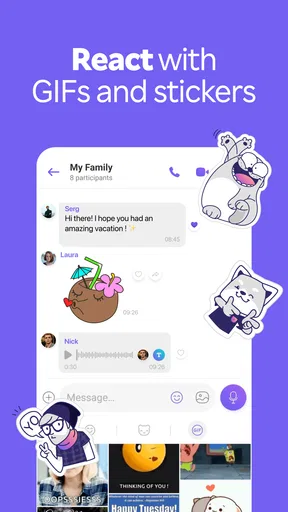
The basic toolkit includes text chats, voice calls, and video calls, while communities give people a place to follow or take part in larger public discussions. Stickers and GIFs add a more playful way to react, and the ability to create stickers can make a familiar group chat feel more personal. These extras are most useful when they suit the group: a lively friend circle may enjoy them, while a practical family thread may stick to short messages and calls.
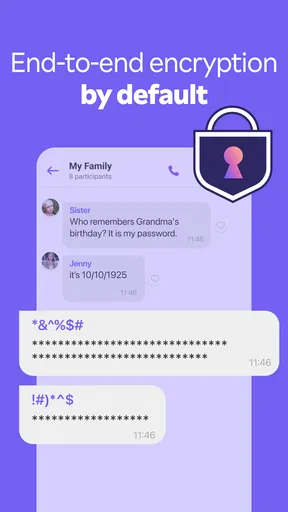
- Private conversations: Viber says personal messages are protected with end-to-end encryption. I see that as a worthwhile safeguard for direct chats, while still treating account security and careful sharing as my responsibility.
- Communities: Large public groups can work like ongoing discussion spaces rather than simple family chats. They are a better fit for following a shared interest than for sending sensitive personal details to a broad audience.
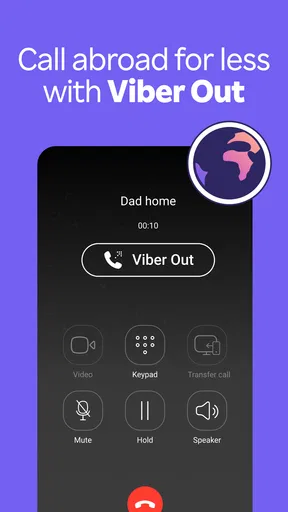
- Calls beyond Viber: Viber Out offers a way to call people who do not use the app, with paid calling. That can help when a regular phone call is necessary, though it makes sense to check the current rates and terms before relying on it.
A practical tip is to keep the purpose of each conversation clear. I would use a small private group for decisions that need everyone’s attention and a community for open-ended discussion. That separation makes it easier to find the important exchange later and reduces the chance that a time-sensitive message disappears among a stream of unrelated posts.
Calls, reliability, and the everyday trade-offs
In my experience, messages arrive quickly and calls are generally clear, although call quality depends on the connection at both ends. Video can feel more personal than a string of texts when relatives or friends are far away, but it is not automatically the best option on a weak or shared connection. For a quick update, a short message may be more considerate and more reliable than starting a video call.
Worth Reading Before You Choose

EA SPORTS FC Mobile 26 Is a Bigger Football Game, but It Takes Time

Flipboard Shows What News Apps Must Do Beyond the Feed

Switching to Android Auto Means Rethinking Your Driving Routine

Google Calendar Makes a Crowded Week Easier to Manage

Ludo King Makes the Most of the Minutes Between Plans

Baby Panda World Brings Quick Play to Modern Phones, but Its Game Library Feels Busy
Viber’s range can also mean more activity to manage. Communities and media-heavy conversations may create a busier inbox than a simple text-only messenger. I recommend muting or leaving discussions that no longer matter rather than letting every group compete for attention. Before sharing a photo or other personal detail in a large space, check whether you are sending it to a private chat or a public community; the audience is part of the privacy decision, not just the app’s security features.
The app is free to download, but it includes in-app purchases priced from $0.99 to $99.99 per item. You can use the core messenger without treating every paid extra as essential; I would first decide whether I actually need a particular purchase or calling option. Viber Out is especially worth approaching with that habit: compare the displayed cost with your usual way of reaching that person before placing calls regularly.
Using Viber across a busy day
Imagine coordinating a family visit while travelling home. A private group can hold the changing arrival details, a voice call can settle a question faster than several messages, and a community can remain separate for a hobby group you follow. That is where Viber’s mix feels practical: the app can handle different kinds of conversation without making every exchange serve the same purpose.
Desktop syncing is useful when you are already working at a computer and want to answer a message without repeatedly picking up your phone. I would treat it as convenience rather than a reason to leave a shared computer signed in. When using another device, take care to sign out if it is not yours, and check that the conversation you are about to send from is the intended one.
The calendar and GIPHY integrations, along with in-app games, are extras rather than the main reason I would install Viber. They may suit someone who likes keeping small social tasks and playful exchanges inside a messenger. If you prefer a lean app, you can simply ignore these additions and focus on calls and chats. The key trade-off is that a broader toolkit can be handy, but it can also feel like clutter if all you want is a quiet place for text messages.
Who will get the most from it
I would recommend Viber to people whose relatives, friends, or communities already rely on it, especially if they want messaging and internet calls in the same app. It is also a sensible option for someone who often switches between a phone and a computer, or who wants a dedicated space for public-interest groups as well as private conversations.
It is less compelling if nearly everyone you contact uses another messenger. Installing a second app for one person can be worthwhile, but asking an entire group to move is a different matter. In that situation, the app your contacts already check is usually more useful than a feature-rich alternative that nobody opens. People who want the simplest possible texting experience may also prefer a more stripped-down option, while those comparing privacy tools should examine the protections and settings of each service rather than relying on a single encryption label.
Compared with familiar alternatives such as WhatsApp or Telegram, Viber’s practical advantage is not that it replaces every other service; it is that its combination of private chats, calling, communities, and desktop access may match a particular social circle. The better messenger is often the one that fits the habits of the people you need to reach. I would choose on that basis, then look at group controls, account options, and the cost of any calling features I expect to use.
Getting Started with Viber
First off, downloading Rakuten Viber Messenger is a breeze. Available on both Android and iOS, it’s a quick and painless install from your respective app store. Once you’ve got it on your phone, setting up your account is straightforward. Just enter your phone number, and Viber sends you a verification code. No fuss, no muss.
After setup, you’re greeted with a clean and intuitive interface. It's all pretty slick—no overwhelming buttons or confusing menus. The main screen shows your chats, and it’s easy to navigate through your contact list, calls, and more.
Features That Stand Out
Viber isn’t just a run-of-the-mill chat app. It’s packed with features that make it stand out. You’ve got the usual suspects like text chats, voice calls, and video calls, but there’s more under the hood.
- End-to-End Encryption: Viber takes your privacy seriously. Every message you send is protected by end-to-end encryption, which means only you and the person you're talking to can read what’s sent.
- Stickers and GIFs Galore: If you love expressing yourself with images, you’re in luck. Viber's got a vast library of stickers and GIFs to choose from, and you can even create your own.
- Communities: Want to join a public chat? Viber’s Communities feature lets you join or create groups with unlimited members. It’s like having your own little forum inside the app.
- Viber Out: Need to call someone who doesn’t have Viber? You can use Viber Out to make international calls at competitive rates.
These features make Viber not just a messaging app, but a full-fledged communication tool. Whether you’re chatting one-on-one or joining a community discussion, it’s got you covered.
Performance and Usability
Now, you might be wondering how it performs in real-world use. In my experience, Viber is pretty reliable. Messages go through quickly, and calls are clear with minimal lag. The video calls, in particular, surprised me with their quality—sharp and smooth, even on a moderate internet connection.
One thing I appreciate is how Viber handles battery life. Some apps are notorious for draining your phone’s battery, but Viber seems to have optimized its performance well. I could chat away for hours without needing to reach for the charger.
Integrations and Extras
Another cool thing about Viber is its integration with other apps and services. You can connect Viber to your calendar, enabling you to send meeting invites directly from the app. There’s also a nifty integration with GIPHY for those who can’t get enough of those looping animations.
Plus, if you’re into gaming, Viber offers in-app games that you can play with friends. It’s a fun little extra that adds to the app’s appeal, especially if you’re waiting around and need a quick distraction.
Also worth mentioning is the ability to sync Viber with your desktop. It’s seamless, and all your chats are available across devices, making it easier to switch between your phone and computer without missing a beat.
Final Thoughts
So, is Rakuten Viber Messenger worth your time? I’d say absolutely. It’s got a user-friendly interface, robust features, and solid performance. Whether you’re a casual chatter or a power user, Viber seems to have something for everyone.
Sure, there are plenty of messaging apps out there, but Viber’s combination of privacy, features, and usability makes it a standout choice. Give it a try, and you might just find it’s the messaging app you’ve been looking for.
Pros
- User-friendly interface for easy navigation.
- End-to-end encryption for secure messaging.
- Supports group video calls up to 20 people.
- Wide range of expressive stickers and GIFs.
- Cross-platform compatibility for seamless use.
Cons
- Occasional lag in sending messages.
- Ad-supported
- which can be intrusive.
- Limited customization options for themes.
- Requires internet for all functionalities.
- High data usage during video calls.
FAQs for Rakuten Viber Messenger
What features does Rakuten Viber Messenger offer?
Rakuten Viber Messenger provides a wide range of features including free text messaging, voice and video calls, group chats, and media sharing. It also supports end-to-end encryption for secure communications. Additionally, Viber users can create communities, send stickers and GIFs, and enjoy Viber Out for calling non-Viber numbers.
Is Rakuten Viber Messenger secure and private to use?
Yes, Rakuten Viber Messenger prioritizes user privacy and security. It offers end-to-end encryption for one-on-one chats and calls, ensuring that only the sender and receiver can read the messages. Viber also provides a trusted contacts feature to verify your contacts' identities and maintains strict privacy policies.
Can I use Rakuten Viber Messenger on multiple devices?
Rakuten Viber Messenger can be used on multiple devices, including smartphones, tablets, and desktops. However, it requires a primary mobile device for account setup. Once set up, you can sync your chats and calls across devices, but note that the mobile device must remain active for the desktop version to function properly.
How does Viber Out work and what are the costs involved?
Viber Out is a feature that allows users to make calls to non-Viber numbers, including landlines and mobile phones worldwide. It is a paid service with competitive rates, and users can purchase credit within the app. The cost varies based on the destination and duration of the call, and Viber offers subscription plans for frequent users.
What should I do if I experience issues with Rakuten Viber Messenger?
If you encounter any issues with Rakuten Viber Messenger, you can start by checking the app's help section for troubleshooting tips. Ensure that you have the latest version of the app installed and that your internet connection is stable. If problems persist, you can contact Viber's customer support through their website or social media channels for further assistance.


